IT asset management · Made in India

Every IT asset, accounted for.

Laptops, accessories, software, contracts, domains and SSL certificates, tracked from purchase to disposal. Handover forms your employees sign online. All on your own servers.

Runs on your serversSign in with Microsoft or GoogleActive Directory syncUpdates in one click, with rollback
assets.yourcompany.com
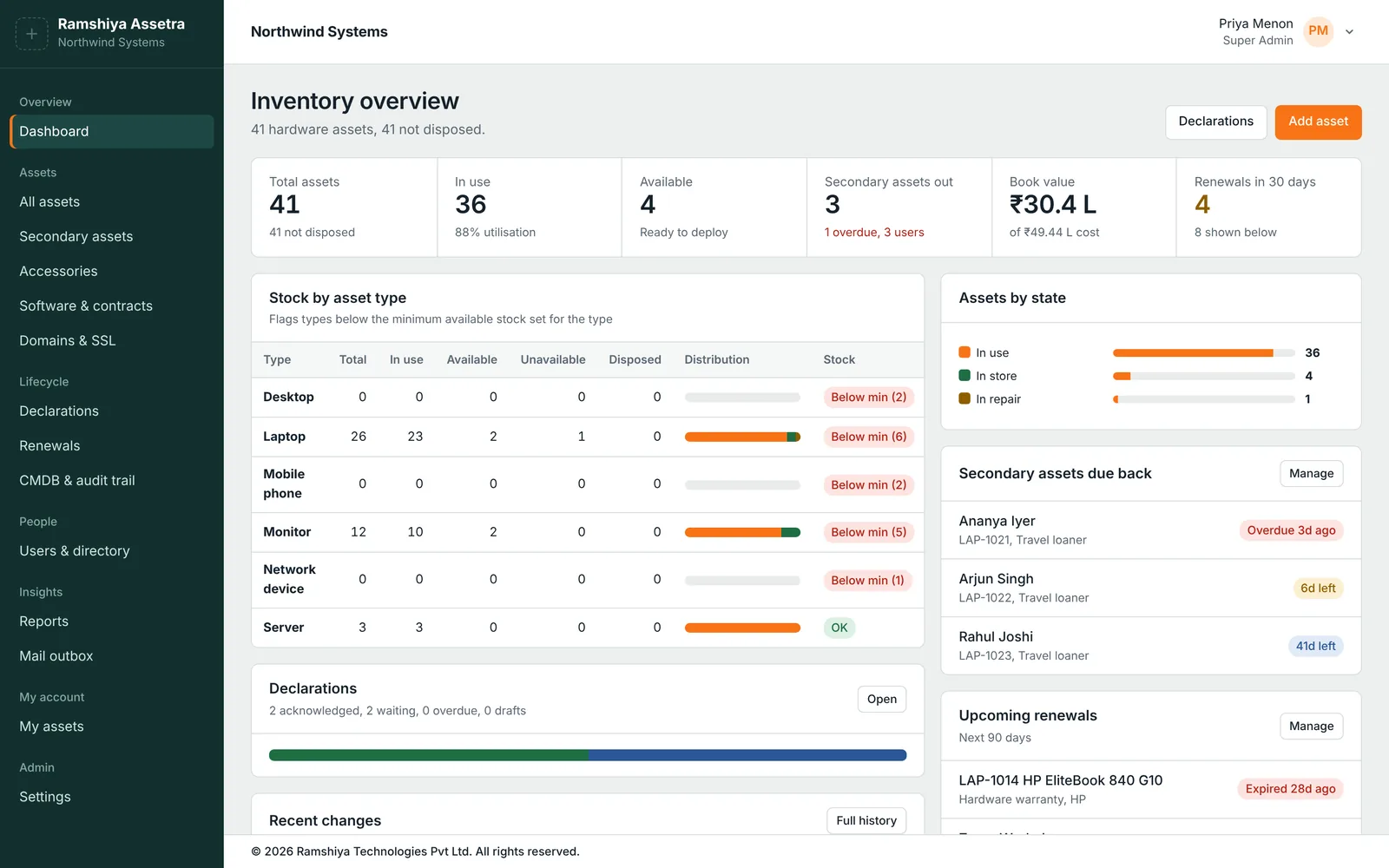
Ramshiya Assetra dashboard: asset totals, utilisation, book value, stock by asset type, loaners due back and upcoming renewals
What it does

One place for everything IT hands out and pays for

Built by an IT team, for IT teams that are tired of spreadsheets, paper handover forms and certificates that expire on a Friday night.

A hardware register that fits your company

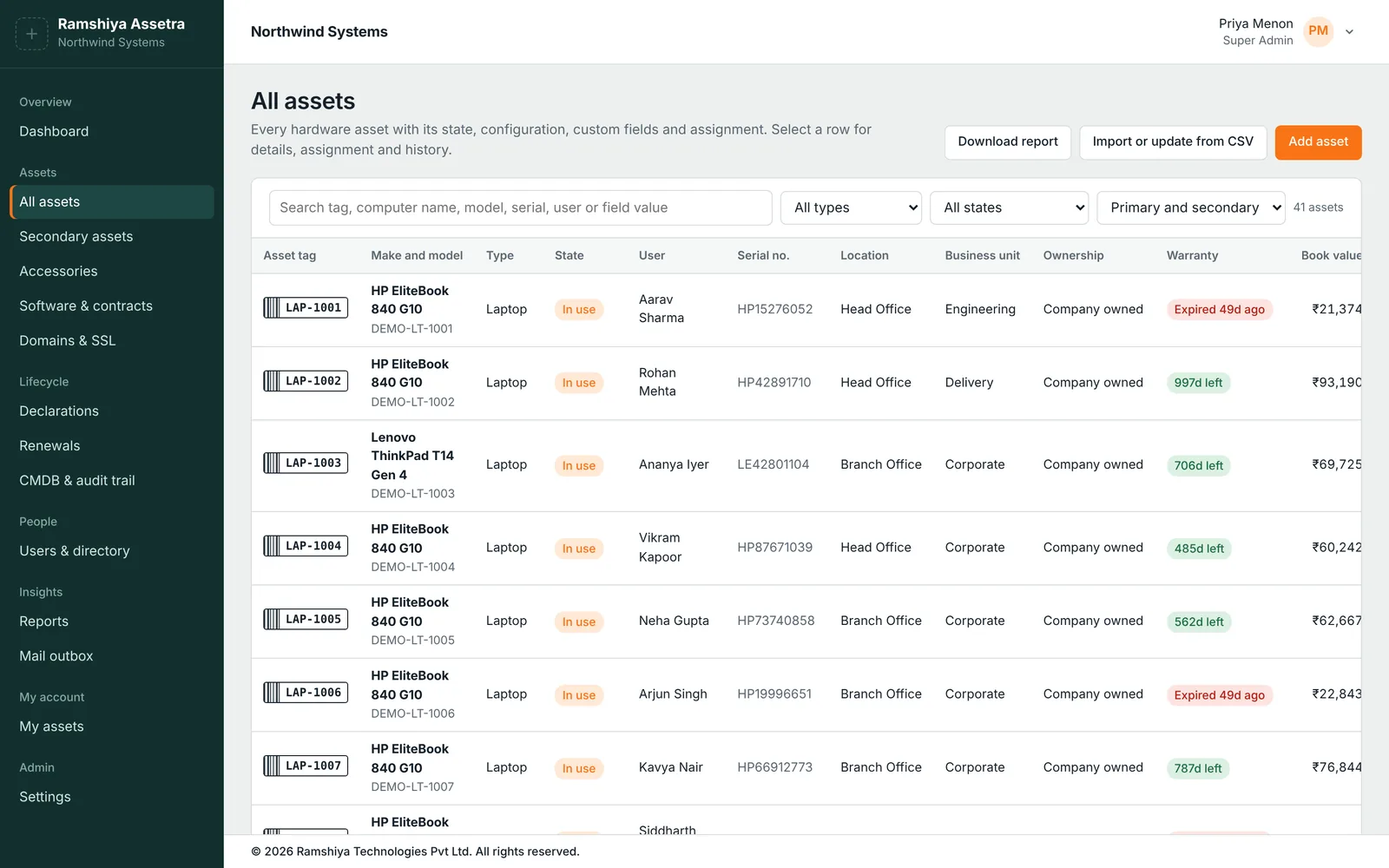
Every laptop, desktop, monitor, phone, server and network device, with who has it, where it is and what it's worth today.

  • Your own asset types, states and custom fields: processor, RAM, IMEI, cost centre, anything
  • Warranty countdowns and straight-line book value on every asset
  • Import and update from CSV; download any view as a report
  • Full history of every assignment, repair and change
Asset list with tags, make and model, state, user, serial number, location, warranty and book value

Handover forms employees sign online

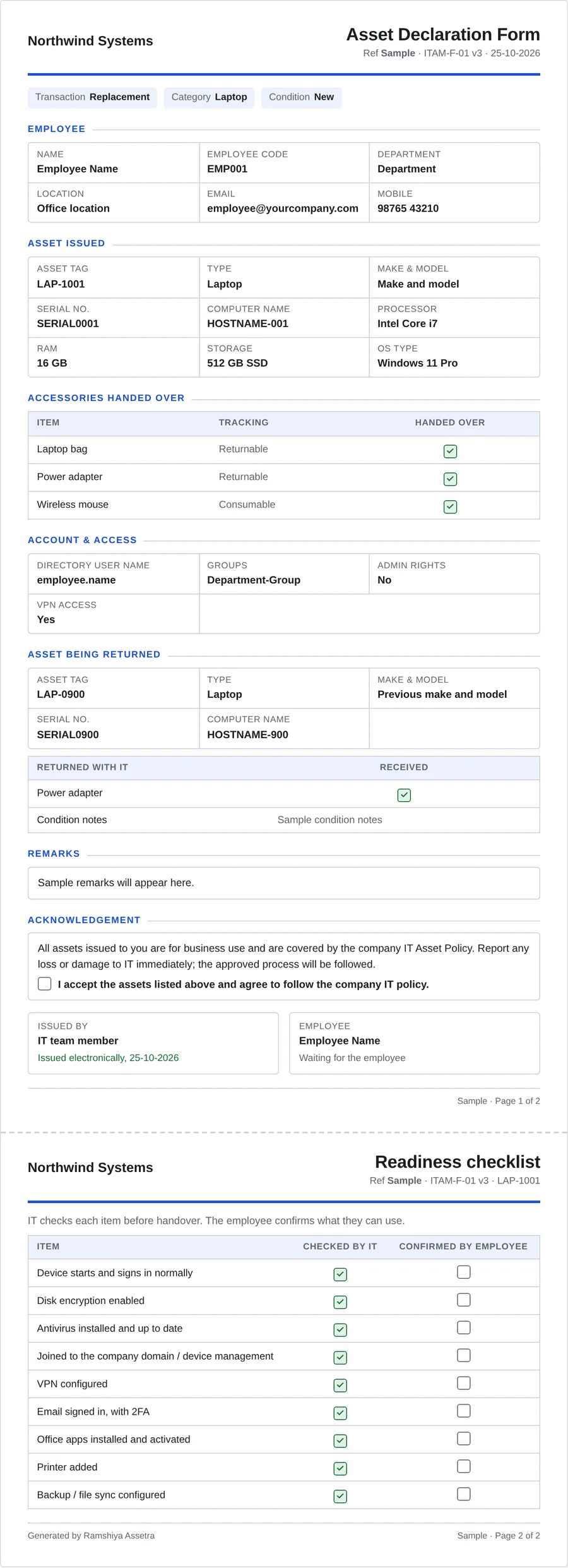
When IT issues a laptop, Assetra fills in the declaration form from the asset and the employee's directory profile and emails a link. The employee checks it and acknowledges by typing their email ID.

  • Your logo, your wording, your colours and your readiness checklist
  • Lists the accessories actually issued and the old device being returned
  • Reminders until it's signed; overdue forms stand out on the dashboard
  • Employees see their own assets and forms under My assets
Two-page asset declaration form with employee, asset, accessories, account and acknowledgement sections

Accessories and loaners that come back

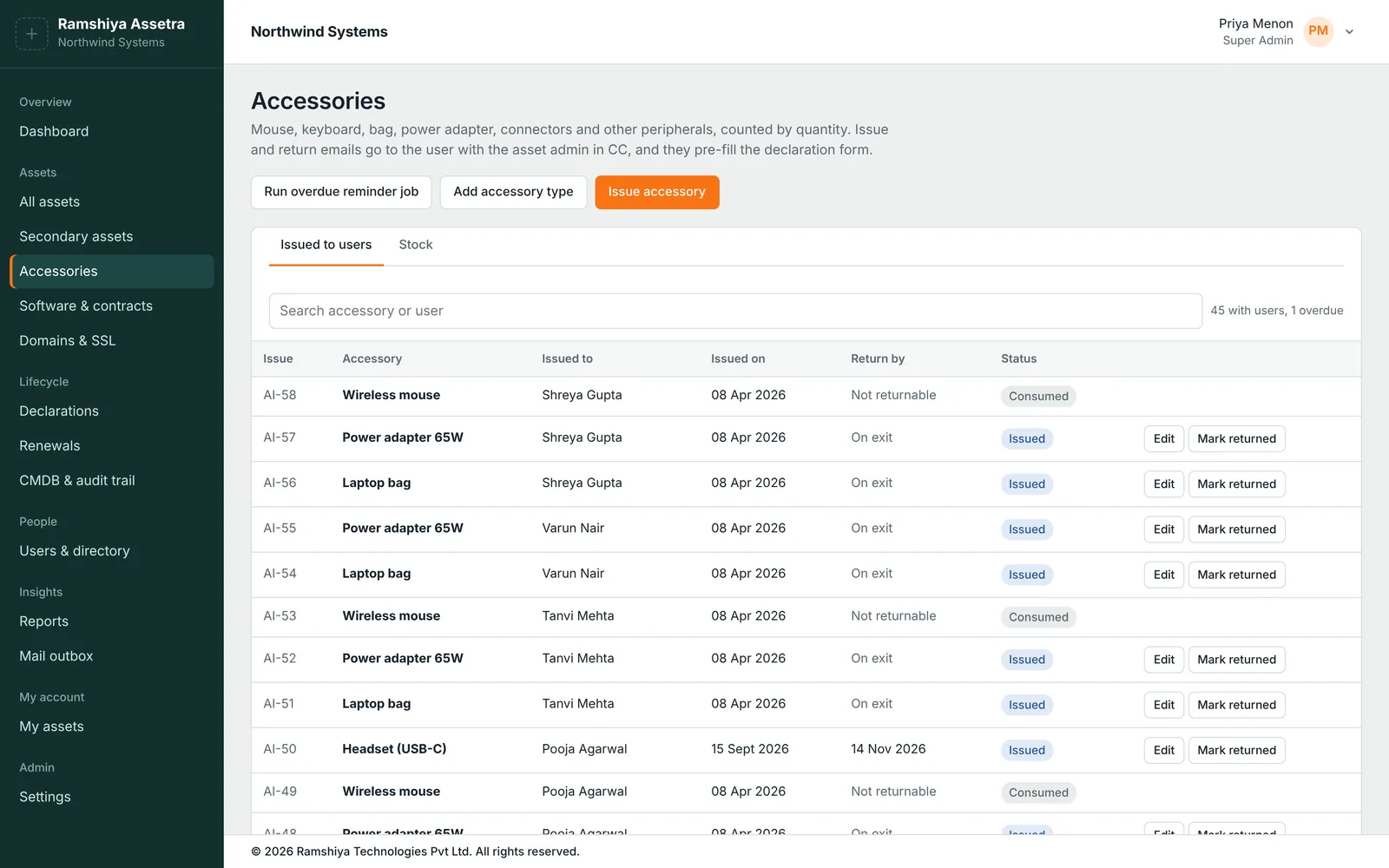
Bags, chargers, mice and headsets are counted by quantity, and loaned laptops carry a return date.

  • Returnable or consumable, with stock levels and reorder points
  • Return dates with automatic reminders to the employee
  • Leavers from Active Directory are flagged so you recover what they hold
Accessories issued to employees, with return dates and overdue status

Every renewal in one queue

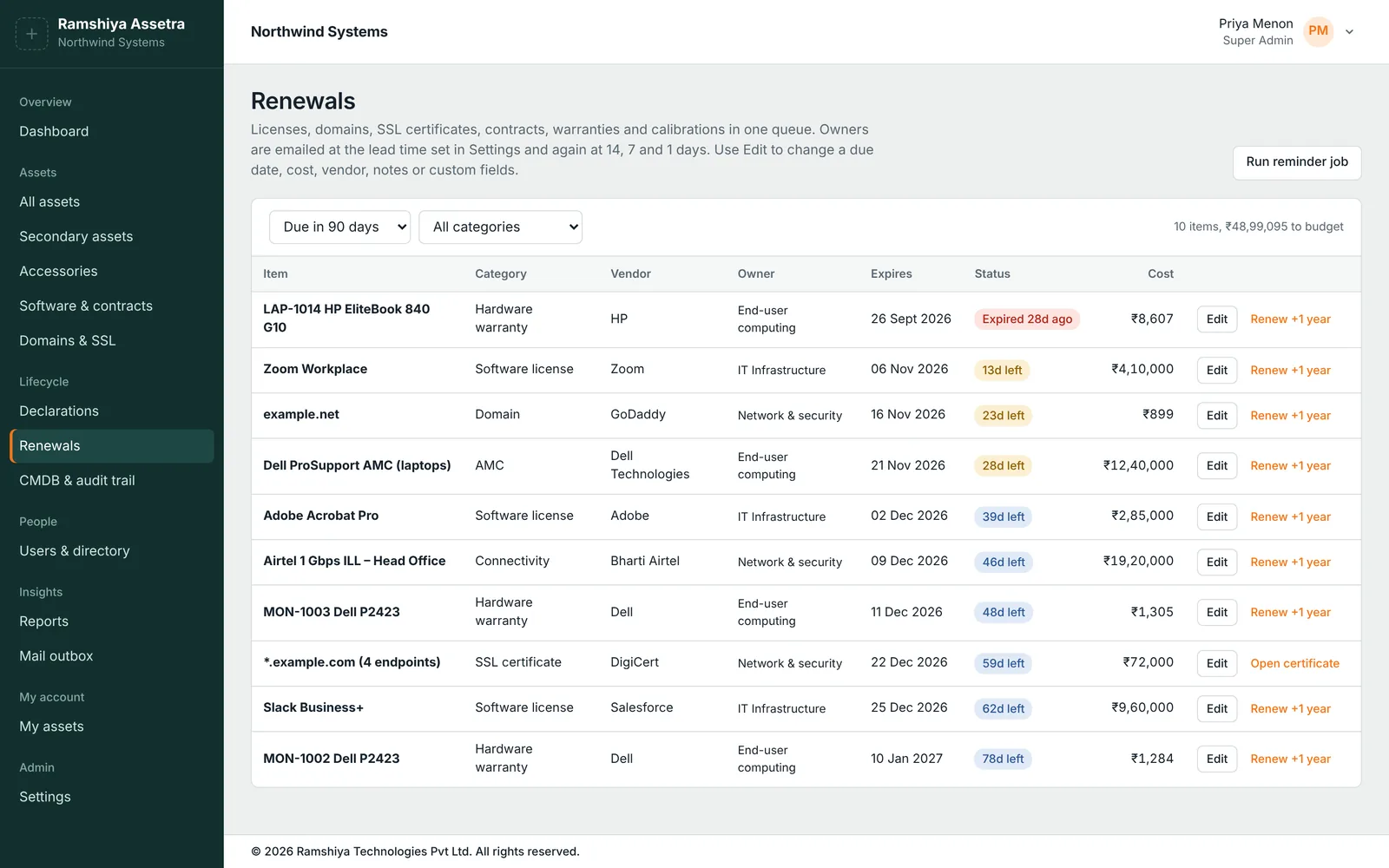
Software licences, AMCs, connectivity contracts, warranties, domains and SSL certificates, sorted by due date with the money you need to budget.

  • Email reminders at your lead time, then at 14, 7 and 1 days
  • Renew in one click, with notes and history kept
  • Certificates track every server and appliance they're installed on
Renewals list with items, categories, vendors, owners, expiry dates, status and cost

Updates without a weekend outage

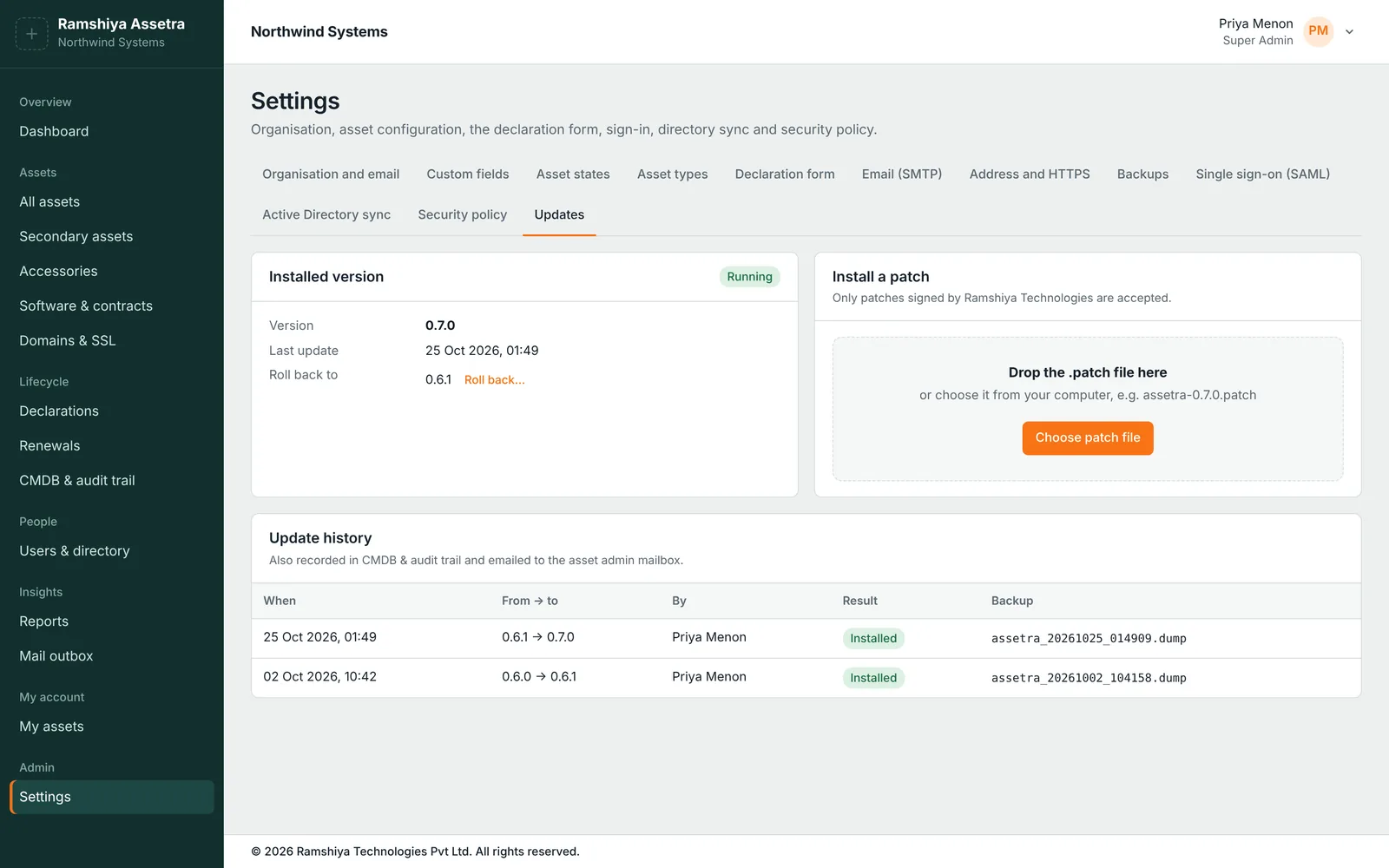
New versions arrive as a single signed file. Your admin uploads it in Settings and confirms with their 2FA code; Assetra does the rest.

  • Rejects any file not signed by Ramshiya Technologies
  • Backs up the database before every update
  • If anything fails, rolls back the files and the database by itself
  • About a minute of downtime; no command line needed
Settings, Updates: installed version, patch upload and update history
Security and administration

Enterprise sign-in, a full audit trail, your data on your network

Single sign-on

SAML sign-in with Microsoft Entra ID, Google Workspace or any SAML 2.0 provider. Map groups to roles.

Two-factor authentication

Authenticator-app codes with one-time recovery codes. Required for admins by default.

Active Directory sync

Creates joiners, updates profiles and flags leavers for asset recovery. Roles stay as you set them.

Roles

Super admins, admins and employees. Employees only ever see their own assets and forms.

CMDB and audit trail

Who changed what, when and from where, for every asset, setting, sign-in and update.

Reports

Ready-made reports plus a report builder. Schedule any report to arrive by email.

Scheduled backups

Daily PostgreSQL backups to a folder or network share, kept for as long as you choose.

HTTPS built in

Install a certificate from a PFX or create a CSR for your internal CA, or publish through IIS.

Mail outbox

Every email Assetra sends, with its delivery status, through your own SMTP server.
Deployment

On your servers, or hosted by us

Most customers run Assetra inside their own network. If that doesn't suit you, we can host it for you.

Recommended

On your servers

Your asset and employee data never leaves your network.

  • Windows Server, with an installer that sets up the service
  • Your own PostgreSQL database
  • HTTPS with your certificate, or behind IIS
  • Updates installed from Settings

Hosted by Ramshiya

We run and update it for you on a private instance.

  • Your own instance and database
  • Backups and updates handled by us
  • Single sign-on and 2FA as on-premises
  • Available on request

30-day free trial

Every feature, on your own data, before you buy.

  • All modules included
  • Import your current asset list from CSV
  • Help with installation and setup
  • Keep your data when you activate a licence
Questions

Good to know

Where is our data stored?

On-premises, everything stays in your own PostgreSQL database on your network: assets, employees, declarations and backups. Assetra only connects out to check whether a newer version is available, and you can turn that off.

What do we need to run it?

A Windows Server with Node.js 20 and PostgreSQL 14 or later. The included scripts install it as a Windows service and can publish it over HTTPS through IIS. An ordinary virtual machine is enough for most organisations.

Can we bring our existing asset list?

Yes. Download the CSV template, fill it from your spreadsheet and upload it. Assetra shows row by row what it will create or change before anything is saved.

Do employees need training?

No. They receive an email, open the form, check it and type their email ID to acknowledge. Signing in with your Microsoft or Google account also shows them the assets they hold.

How are updates delivered?

As a signed patch file. Your super admin uploads it in Settings and confirms with their 2FA code. Assetra backs up the database, installs it and checks that the new version starts; if anything goes wrong, it restores the previous version and the backup automatically.

How is it priced?

Write to [email protected] with the number of assets and employees you manage, and whether you want it on-premises or hosted. We'll send a quote along with your trial.

Ready to retire the asset spreadsheet?

Start a 30-day trial with all features, or book a 30-minute walkthrough with our team.